Important announcement

Due to operational issues, we have had to suspend our food waste collection service for a number of areas on Thursday 25 June and Friday 26 June. In addition, the recycling collection service in Twechar is affected. To see a full list of affected streets, visit our Food Waste and Recycling Collection Suspension page.

All credit memos must be raised and approved on IRF Service User Approver.

Users who raise credit memos must request authorisation from a list of approvers. The following steps outline the process to approve a credit memo.

1. Select Smart Forms

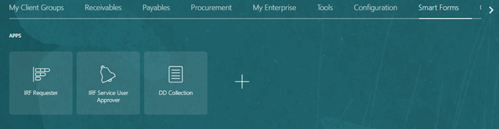
Screenshot showing a cursor hovering over Smart Forms tab

2. Select IRF Service User Approver

Screenshot showing the applications within the Smart Forms tab including IRF Service User Approver

3. Complete appropriate fields
4. Select Search
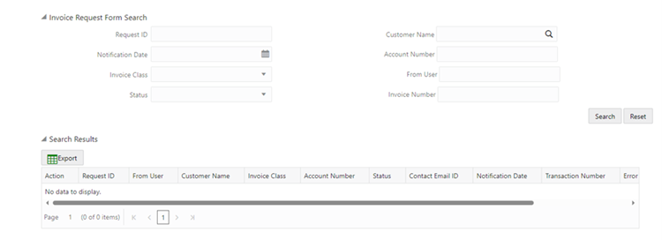
Screenshot showing the Request Form fields, Request ID, Notification Date, Invoice Class, Status. Search Results displaying below.

5. Select Request ID to view details
6. At Action, select tick to approve
7. At Action, select cross to reject and add reason for rejection

Screenshot of the search results with the Action and Request ID highlighted with a red rectangle

8. If approved, Transaction Number is displayed

Screenshot of the search results, with the Transaction number highlighted with a red rectangle